Vendors in VendorPayout
Vendors aren't added directly to VendorPayout. Instead, they're imported from the Vendor field in the Product Organization section of the products in your Shopify admin. When orders are imported, VendorPayout creates vendor records based on Shopify's Vendor field and tracks sales to calculate commissions.
Taxes & Shipping
VendorPayout calculates payouts based upon the value of the products sold, not the overall order total. Taxes and shipping are not included in vendor payouts.
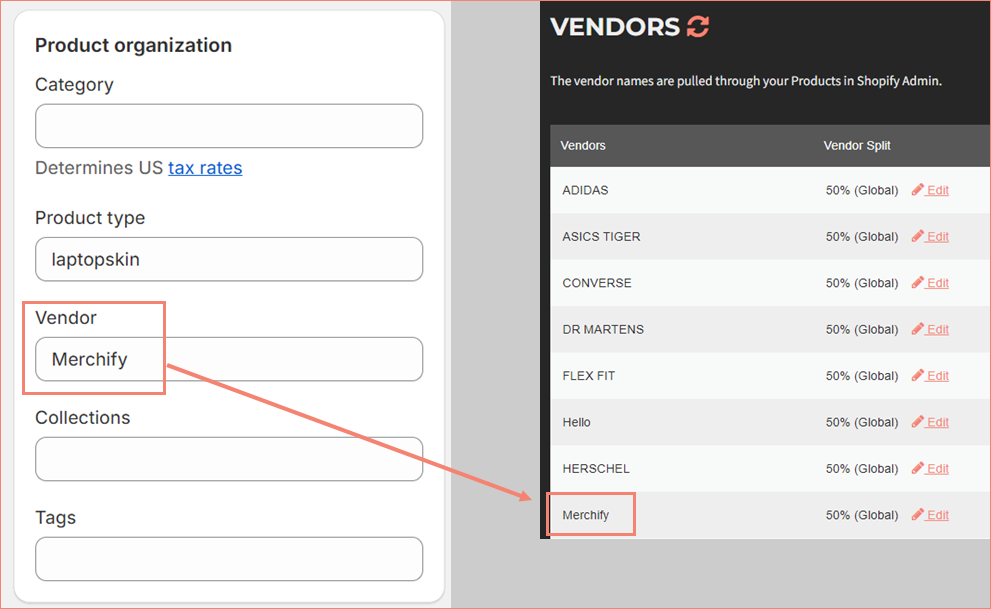
Verify Your Vendors in Shopify
Before configuring splits and commissions, verify your vendor assignments in Shopify:
- Log into your Shopify admin
- Click Products in the left menu
- Review and update vendor assignments as needed
Shopify allows bulk editing of products for efficiency.
Next Steps
Once your vendors are verified in Shopify, you're ready to configure splits and payouts within VendorPayout.